TL;DR: Isaac ROS brings powerful GPU accelerated robotics packages, but installing the full ROS, CUDA, TensorRT, NITROS and GXF stack can be painful. With Pixi and isaac-forge, these packages are available as conda packages and can be installed in a reproducible environment.
Try it directly on your Jetson:
What makes Isaac ROS 5.0 so cool?
Isaac ROS already allows ROS users to replace some of their ROS packages with CUDA accelerated version of the same package. For example replacing ros-lyrical-apriltag with ros-lyrical-isaac-ros-apriltag will increase the performance by utilizing the NVIDIA GPU.
Isaac ROS 5.0 extends this with the ability to let nodes communicate messages where the content stays on the GPU memory (CUDA IPC) avoiding the copy from GPU to CPU back to GPU when needed. More information can be found in their blogpost
You can make use of the cuda buffer backend by adding the ros-lyrical-cuda-buffer-backend = "*" dependency to your environment. The Isaac ROS nodes automatically make use of it when available.
Why use Pixi for Isaac ROS?
Starting a project often means installing a lot of dependencies. You get them from a pre-built image, or Dockerfile or you go through the installation instructions for each package.
This is not where you want to spend your robotics engineering energy. You want to run the example, change it, test it on your workstation, and later move it to a Jetson.
That is why I got very excited when our CEO Wolf started working on isaac-forge. It packages Isaac ROS 4.6.0 for ROS 2 Jazzy, and 5.0 for ROS 2 Lyrical, as conda packages, built on top of RoboStack. This means we can install Isaac ROS with Pixi, just like any other project dependency.
A Pixi environment for Isaac ROS
The idea is to make installation simple and reproducible. Allowing you to share and modify the environment without having to worry about the installation steps. When you break your environment, it’s just a git checkout away from a working state.
What you’ll need are these three channels, think of them as the debian apt repositories but for conda packages:
isaac-forge for Isaac ROS and the NVIDIA related packages that are packaged there.
robostack-jazzy and robostack-lyrical for ROS 2.
conda-forge for everything else.
A minimal YOLOv8 workspace would look like this:
Install the environment and run ROS through Pixi:
That’s it. You now have a ROS 2 environment with Isaac ROS packages installed from a pixi.toml . A full example can be found here.
Declarative CUDA environments
For an Orin Nano on JetPack 7, the isaac-forge example declares this platform:
That tells Pixi the target is ARM64, uses the glibc floor, expects a CUDA 13 capable driver, and has an SM87 architecture GPU. This is enough information for the dependency solver to select packages that match the target.
The only thing Pixi cannot do is install the NVIDIA driver, because that is a kernel module. After that, the rest of the CUDA stack can be installed in the project environment, and you can run your code with pixi run.
Let's start with an apriltag example
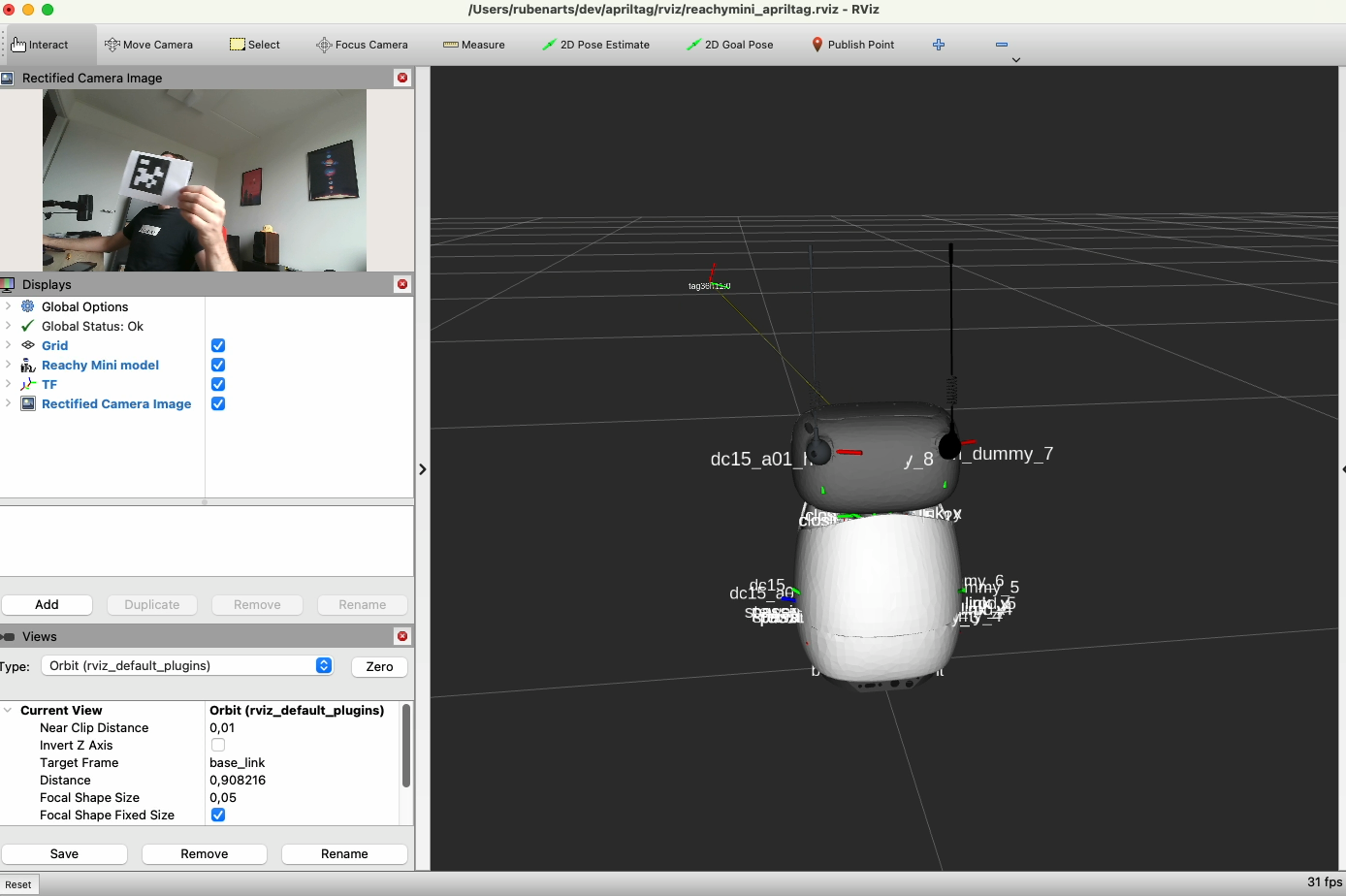
Here we let the camera from a reachy-mini robot connected to a Jetson Nano run the ros-jazzy-isaac-ros-apriltag build on isaac-forge example. The tracker can easily follow the tag with a high update speed. The Jetson publishes the detection information and I can visualize all of the information on my MacBook where I also installed ros-jazzy-rviz2 to show the stack.
This mix of machines would normally be a really complex setup but with Pixi it can be as easy as any other setup, and even easier. As the normal rosdep would potentionally break my system setup to install this environment. One pixi clean command and ros2 doesn't exist on my machine anymore.
Try it out
If you have a Linux workstation or Jetson, with a compatible NVIDIA driver, try the YOLO example:
I think this is a great step for the robotics ecosystem. Isaac ROS is powerful, RoboStack already made ROS available in the conda ecosystem, and Pixi makes the environment easy to share with your team.
Less time installing, more time building robots. Happy robotics developing!
git clone https://github.com/prefix-dev/isaac-forge.gitcd isaac-forge/examples/yolov8pixi run demo
git clone https://github.com/prefix-dev/isaac-forge.gitcd isaac-forge/examples/yolov8pixi run demo
[workspace]channels = ["https://prefix.dev/isaac-forge/lyrical"]platforms = [ { platform = "linux-64", glibc = "2.38", cuda = "13" }, { name = "jetson", platform = "linux-aarch64", glibc = "2.38", cuda = { driver = "13", arch = "8.7" } },][dependencies]ros-lyrical-ros-base = "*"# Gives you the image processing dependenciesros-lyrical-isaac-ros-image-proc = "5.0.*"ros-lyrical-isaac-ros-dnn-image-encoder = "5.0.*"# Gives you the NVIDIA tensorRT librariesros-lyrical-isaac-ros-tensor-rt = "5.0.*"# Gives you the Yolov8 package with CUDA enabled messagesros-lyrical-isaac-ros-yolov8 = "5.0.*"# Allows you to use the cuda backend for the ROS idl bufferros-lyrical-cuda-buffer-backend = "5.0.*"
> pixi install> pixi shell# Now you have a full ros workspace available, for example check the component types:> ros2 component types | grep isaacisaac_ros_tensor_proc nvidia::isaac_ros::dnn_inference::InterleavedToPlanarNode ...isaac_ros_image_proc nvidia::isaac_ros::image_proc::AlphaBlendNode ...isaac_ros_tensor_rt nvidia::isaac_ros::dnn_inference::TensorRTNodeisaac_ros_yolov8 nvidia::isaac_ros::yolov8::YoloV8DecoderNode
:focal(smart))